Gemini AI Hairstyle Choosing a new haircut sounds easy until you actually sit in the barber’s chair.
You might save a hairstyle from Instagram, show it to your barber and expect the same result. But once the haircut is finished, you may realise that the style you liked on someone else doesn’t look the same on your face.
Now there is an easier way to get an idea before cutting your hair.
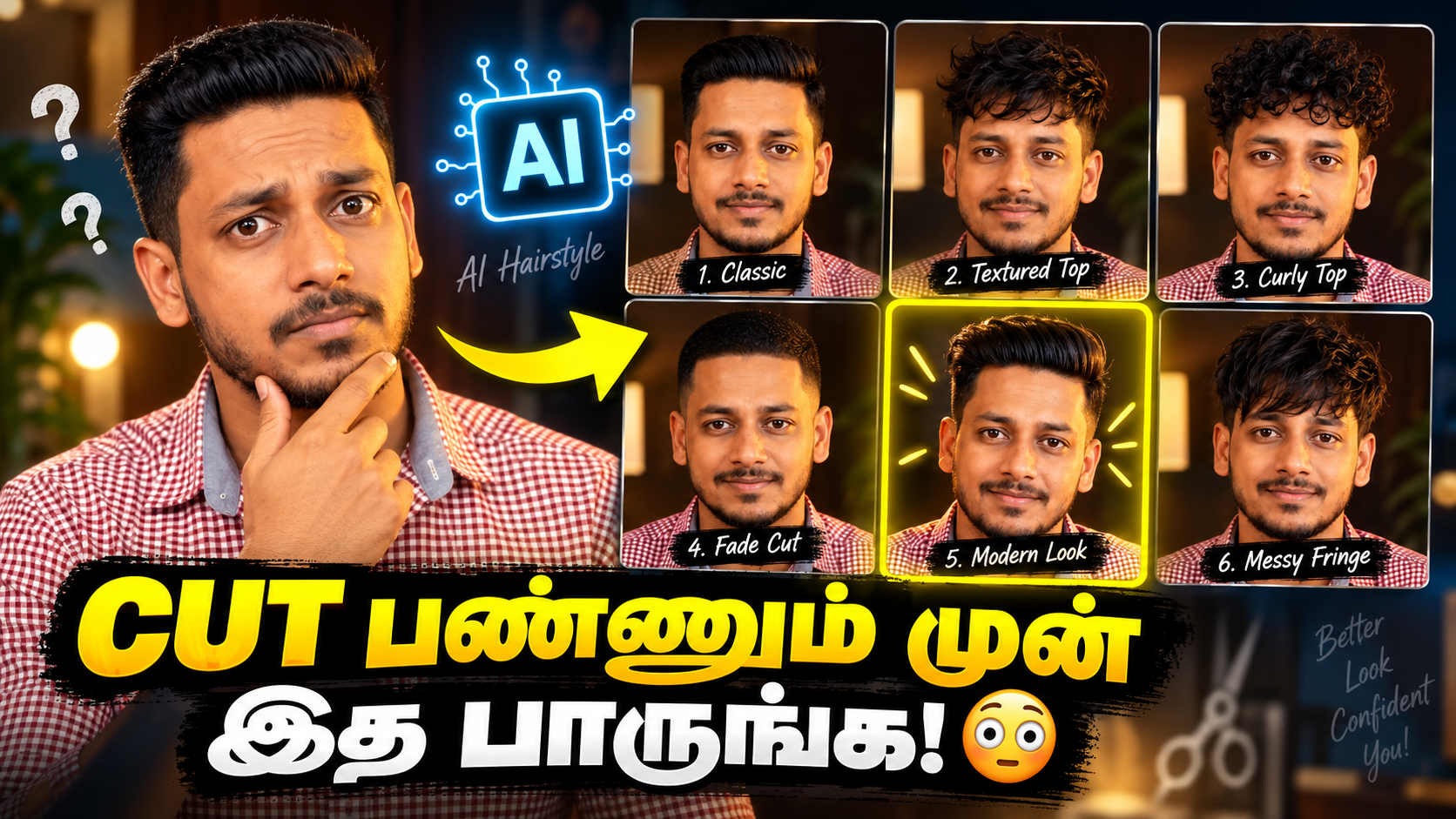
Using Google Gemini, you can upload a clear selfie and ask AI to generate multiple hairstyles while keeping the same face. You can then compare different looks such as a Low Taper Fade, Textured Crop, Middle Part, Wolf Cut, Buzz Cut and more before deciding which haircut you want.
Google officially supports uploading an existing image to Gemini and asking it to make specific edits. Its current image tools also focus on maintaining a person’s appearance across generated images, which makes this kind of hairstyle experiment possible.
Here’s how to try it.
What Is the Gemini AI Hairstyle Trick?
The idea is simple. Take one clear selfie or portrait photo and upload it to Gemini. Then give Gemini a prompt asking it to keep your face, skin tone, beard and other facial features consistent while changing only your hairstyle. Instead of generating just one haircut, you can ask for several different hairstyles in a single comparison image.
For example, you can compare:
- Low Taper Fade
- Mid Fade with Textured Top
- Messy Textured Crop
- Fluffy Middle Part
- Messy Fringe
- Modern Wolf Cut
- Classic Slick Back
- Buzz Cut
- Side Part
- Voluminous Quiff
- Curly Top with Fade
- Korean Two-Block
Looking at these styles side by side makes it much easier to shortlist a haircut before visiting your barber.
How to Try Hairstyles With Your Own Photo
First, take or select a clear photograph of yourself.
For better results, use a photo where your entire face and hairline are clearly visible. A front-facing image with good lighting and a simple background is usually a good starting point.
Next, open the Gemini app or Gemini website and upload the photo.
Google’s current Gemini image-editing workflow allows you to upload an existing image and describe the changes you want using a text prompt.
After uploading the selfie, paste the hairstyle prompt given below.
Gemini will then create an AI-edited version based on your instructions.
Copy This Gemini Hairstyle Prompt
Prompt:
Use my uploaded photo as the exact visual reference for the person. Preserve my recognizable facial identity, face shape, skin tone, eyes, nose, lips, eyebrows, ears, beard and moustache as accurately as possible.
Do not redesign or beautify my face. Change only the hairstyle.
Create a realistic hairstyle comparison grid showing the same person with 12 different hairstyles:
- Low Taper Fade
- Mid Fade with Textured Top
- Messy Textured Crop
- Fluffy Middle Part
- Messy Fringe
- Modern Wolf Cut with Shaggy Layers
- Classic Slick Back
- Sharp Buzz Cut
- Professional Side Part
- Voluminous Quiff
- Curly Top with Fade
- Modern Korean Two-Block Hairstyle
Keep the exact same face, camera angle, expression, skin tone and lighting across every version. Only the hair should change.
Make every hairstyle realistic with natural hair strands, believable density, accurate hairline, realistic shadows and professional barber-quality styling.
Arrange all 12 versions in a clean comparison grid so I can easily decide which haircut suits my face best. Photorealistic output, no distorted face, no duplicate facial features and no unnecessary accessories.
Ask Gemini Which Hairstyle Suits Your Face
After generating the comparison, you can take the experiment one step further.
Ask Gemini:
Based on my visible face shape and the hairstyle comparison you generated, which three hairstyles appear most visually suitable for me? Explain why. Do not treat this as a professional styling assessment.
This can give you a useful shortlist.
But remember that an AI recommendation is only a visual suggestion.
Your real hair texture, thickness, density, growth pattern and hairline also affect how a haircut will look in real life.
Generate Your Favourite Haircut Separately
Once you have selected your favourite hairstyle, don’t stop with the collage.
Ask Gemini to generate a larger version of that particular haircut.
For example:
Use my original uploaded photo again. Keep my recognizable facial identity unchanged and change only my hair to a realistic Low Taper Fade with a naturally textured top. Keep my original face shape, skin tone, beard, moustache and expression. Make the haircut realistic enough to use as a visual reference for my barber.
Now you’ll have a cleaner reference photo.
You can save it on your phone and show it to your barber.
Try Different Variations of the Same Haircut
This is another useful AI trick.
Let’s say you’ve decided that a Low Taper Fade suits you.
There are still different ways to style the top.
You can ask Gemini to show you the same haircut with a textured top, messy top, short fringe or longer volume.
That way, you’re not simply choosing between completely different haircuts. You’re fine-tuning the hairstyle you already like.
What If Gemini Changes Your Face?
AI image editing isn’t perfect.
Sometimes you may notice that the generated image changes your jawline, skin, beard, eyes or other facial details along with your hairstyle.
If this happens, don’t automatically use that result as your haircut reference.
Try a follow-up instruction such as:
The face has changed too much. Use my original uploaded photo again as the identity reference. Preserve my recognizable facial features and change only the hair.
You can regenerate the result until you get something closer to your original appearance.
Gemini’s current image tools include character-consistency and local-editing capabilities, but generated results can still vary.
Can Women Try This Too?
Yes. The same concept isn’t limited to men’s haircuts. You can change the hairstyle list in the prompt and ask for styles such as Bob Cut, Layered Hair, Curtain Bangs, Butterfly Cut, Long Waves, Pixie Cut or other hairstyles you’re considering. The basic workflow remains the same: Upload your photo → tell Gemini to preserve your appearance → specify the hairstyles → generate the comparison → choose your favourites.
Google Gemini Prompts for Haircut Reference:
Male Prompt
Coclusion
The Gemini AI Hairstyle Try-On is a useful trick if you’re planning a new haircut but don’t know which style will suit your face.
Instead of looking at hairstyles on models or celebrities, upload your own selfie and generate multiple haircut variations using the same face.
Compare a Low Taper Fade with a Buzz Cut.
Try a Textured Crop against a Middle Part.
Experiment with a Wolf Cut or Korean Two-Block without actually cutting a single strand of hair.
Once you find a style you like, generate a clean individual version and use it as a visual reference when you visit your barber.
AI can’t replace a professional hairstylist, but it can make the decision before your next haircut a lot easier.